


AI Search Monitoring Tool: Track ChatGPT, Gemini, Google AIO





Many teams check ChatGPT one day, Google the next and Gemini when someone remembers. The results never line up, because the prompts and settings change from one check to the next.
What follows is one workflow for all three platforms, with room to add Google AI Mode, Microsoft Copilot and Claude later. The screenshots come from Ansvisor, an open-source AI search intelligence platform.
Key takeaways
- Run one shared prompt set on all three platforms, so the results compare cleanly.
- Record the same fields for every answer: whether your brand was mentioned, which URLs were cited, which competitors appeared, and the full text.
- Report each platform separately. In our data, a brand’s share of voice can differ several-fold between AI engines in the same month.
- Run prompts several times per period, because AI answers change from run to run.
- Close the loop. After you act on a finding, validate it on the same prompts.
What is an AI search monitoring tool?
An AI search monitoring tool runs your prompts in AI assistants and AI search features on a schedule. It records how each answer treats your brand and stores the history.
A useful tool answers six questions:
Does your brand appear for the questions buyers ask?
How often does the answer name you?
Which of your URLs are used as sources?
Who appears when you don’t?
Is visibility rising or falling over time?
Do those answers send visits to your site?
Our glossary entry on AI search monitoring defines the metric behind each one.
Why track ChatGPT, Gemini and Google AIO together?
Buyers use all three. In a February 2026 Pew Research Center survey, 44% of US adults said they use ChatGPT and 24% Gemini.
Google AI Overviews reach searchers inside Google itself. And the three platforms rarely agree on which brands and sources to show.
We see this in our own numbers. In Ansvisor tracking data from September 15 to October 14, 2026, a brand’s share of voice can differ several-fold between AI engines in the same month.
Citations spread differently too. In the same period, AI Overviews and ChatGPT each cited over four times as many different pages from our site as Gemini.
A combined score would have hidden all of it. So the workflow below keeps one prompt set and reports each platform on its own.
How to track ChatGPT, Gemini and Google AIO in one workflow
Step 1: Build one shared prompt set
Start with 25 to 100 prompts that match how buyers ask about your category. Mix "best tool for" questions with comparisons and alternatives, plus pricing and problem questions.
Use the same wording on every platform. Group prompts by topic, and keep branded prompts separate from non-branded ones.

Our guide to finding AI search prompts that drive revenue shows how to choose and prioritize them.
Step 2: Set platform-specific conditions
Keep the prompts identical, but fix the settings that each platform needs. Write them down so every run uses the same setup.
In ChatGPT, use logged-out sessions or turn off memory, and note whether web search ran.
In Gemini, record whether the answer showed sources. Not every answer does.
For Google AI Overviews, fix country, language and device, and use a signed-out window.
Track Google AI Mode as its own channel, because Google says its links can differ from AI Overviews.
Step 3: Run on a fixed schedule, more than once
Run the full set weekly, with several runs per prompt. One answer is a sample; the share of runs that include your brand is the metric.
Check high-value prompts more often during launches or after big content changes.
Step 4: Record the same fields for every answer
Log the same fields for every prompt and platform, run after run. Then you can compare results across platforms and weeks.
- Date, platform and prompt
- Brand mentioned (yes or no) and position if the answer is a list
- Your cited URLs and competitor cited URLs
- Competitor brands named
- The full answer text
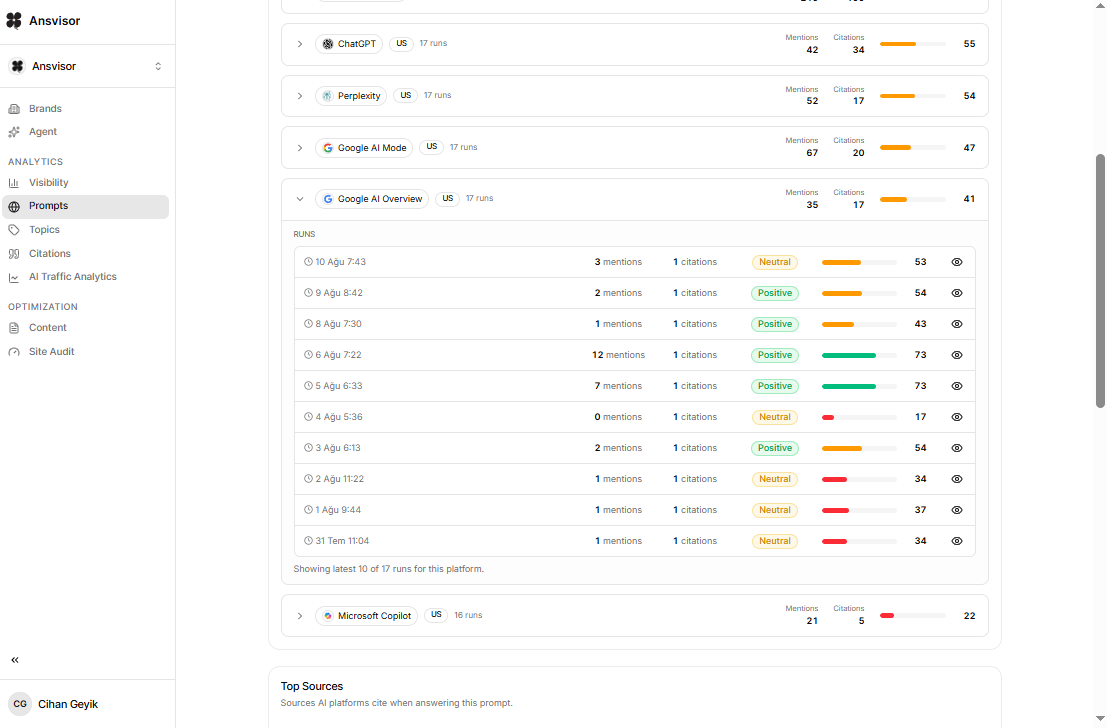
Step 5: Review citations at the URL level
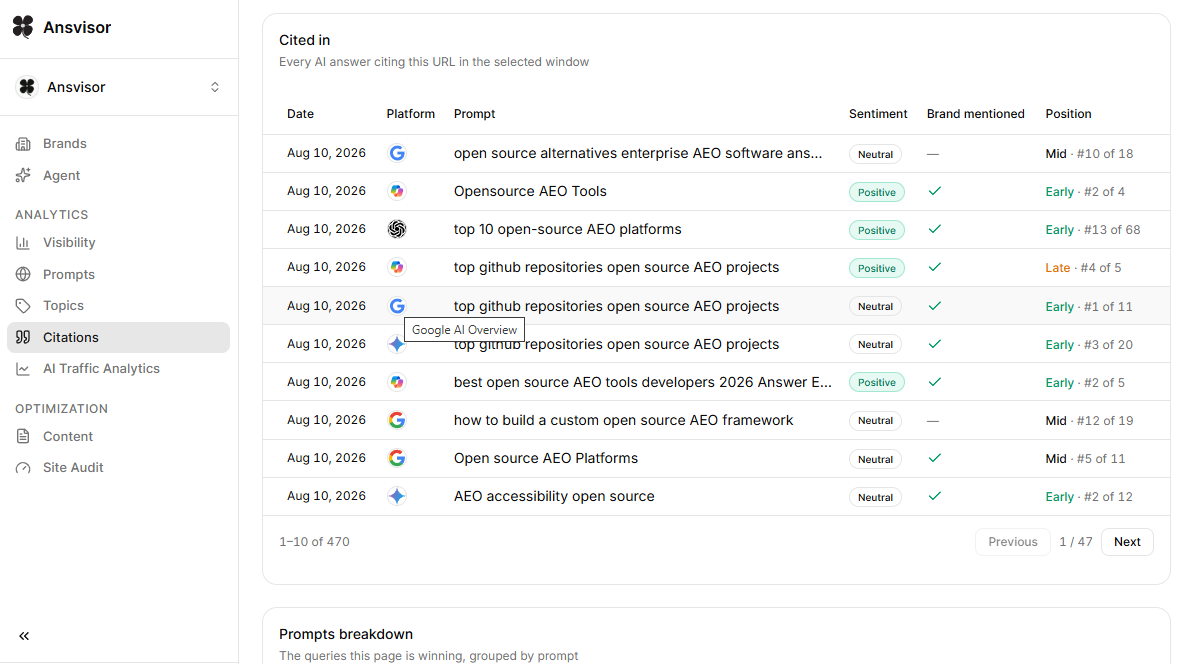
Domain totals hide the detail you need. Look at the exact pages each platform cites, and which prompts produced each citation.
- Find your most-cited pages and keep them accurate and current.
- Spot competitor pages cited across many prompts.
- List the third-party sources that shape answers, such as review sites, forum threads and media.
- Note pages that lost citations since the last run.
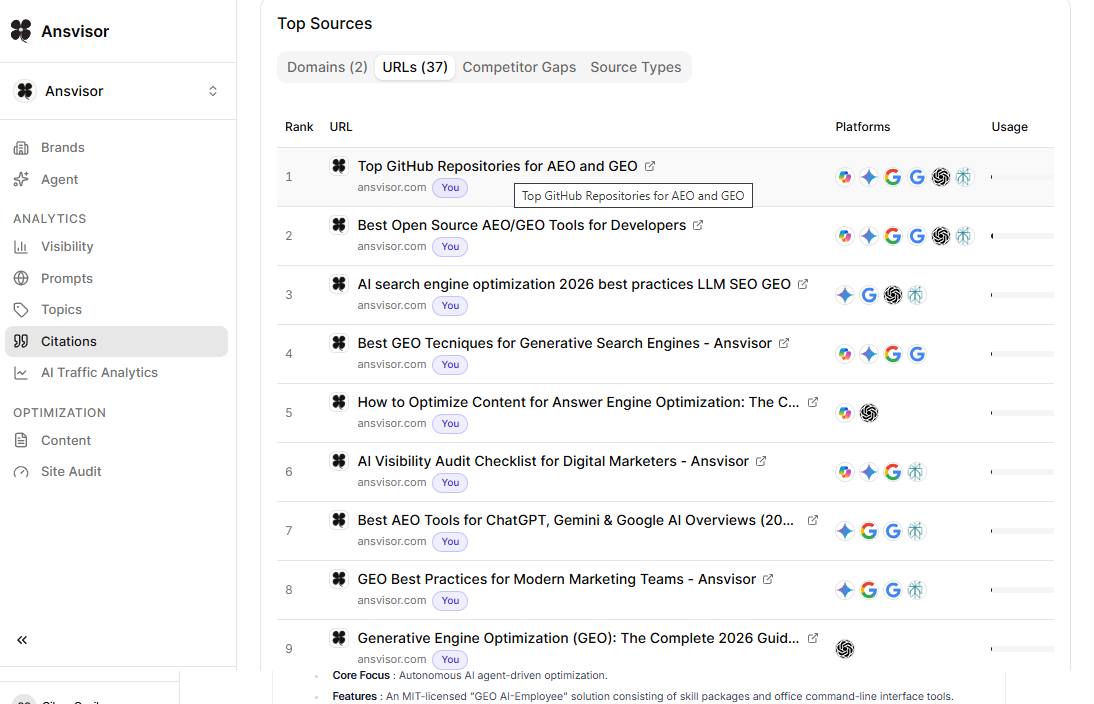
Open any cited URL to see every prompt and platform behind it. You’ll see whether a page wins in one engine or across all three.
Step 6: Compare competitors and share of voice
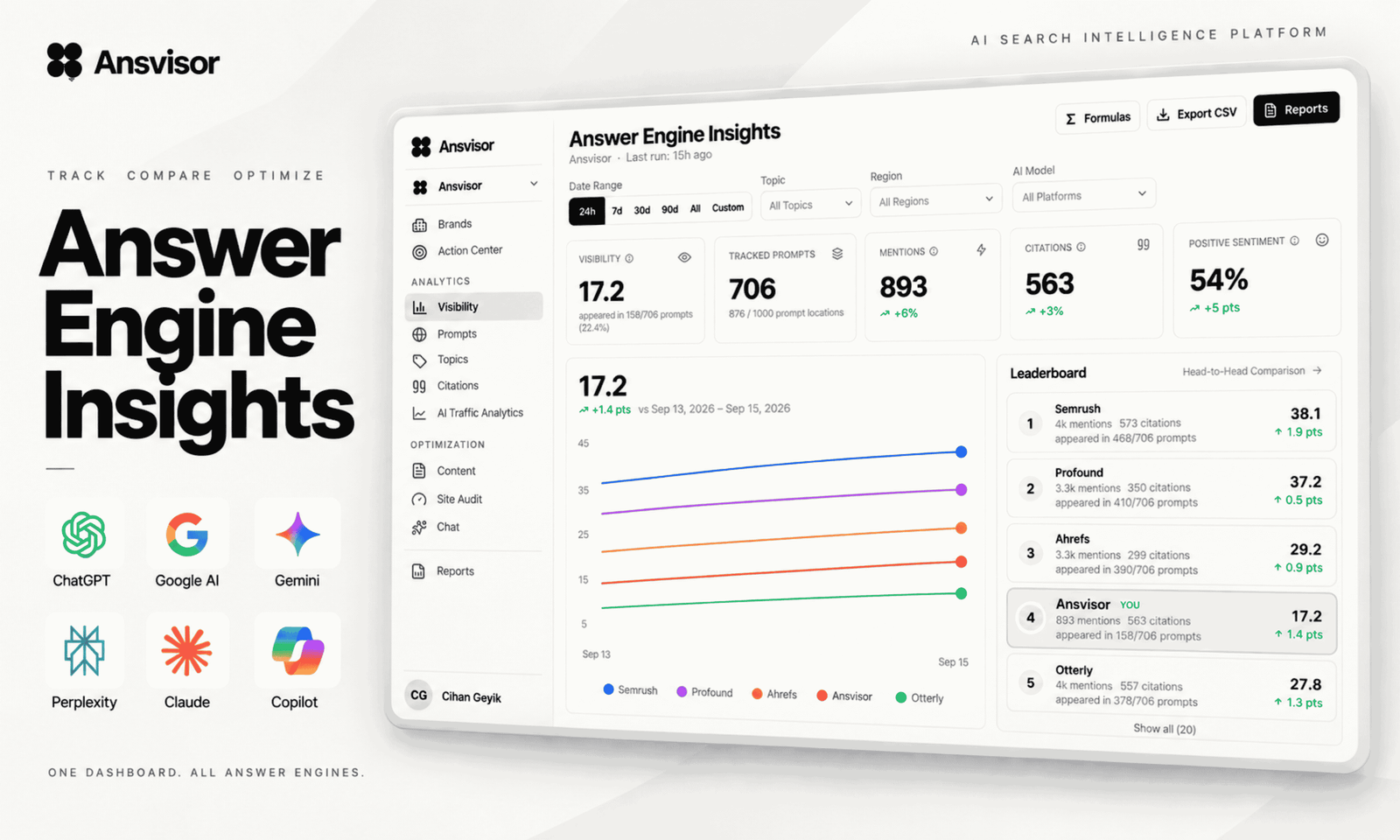
Score competitors on the same prompts and runs. Then compare mention rate, citation rate and AI share of voice on each platform.
A rival can lead in Gemini and trail in ChatGPT. Those gaps tell you where to focus first.
Step 7: Act, then validate on the same prompts
Monitoring only pays off when it changes what your team does. The loop has four stages:
- Monitor: run the shared prompt set on every platform.
- Investigate: review mentions and cited URLs, then look at competitors and source patterns.
- Act: improve a target page, add missing facts, earn third-party coverage or fix a crawl issue.
- Validate: rerun the same prompts and check whether visibility changed.
A weekly AI search monitoring report template
Use the same one-page report every week, so the discussion stays on what changed.
← Scroll horizontally to see the full template →
| Report section | What to include |
|---|---|
| 1. Mention and citation rates | Open with mention rate and citation rate on each of the three platforms, plus the change since last week. |
| 2. Share of voice | Show your share of voice against your top three competitors, per platform. |
| 3. Wins | List the wins: prompts where you gained a mention or citation, with the cited URL. |
| 4. Losses | List the losses: prompts and pages that dropped out, and who replaced you. |
| 5. Outreach targets | Name the third-party pages cited on two or more platforms. Those are your outreach targets. |
| 6. Actions and owners | Write down this week’s actions, who owns each one and which prompts will validate it. |
| 7. Setup changes | Note any change to the prompt set, the settings or the counting rules. |
Platform notes: what each engine shows
ChatGPT
Links appear mainly when ChatGPT searches the web. OpenAI’s crawler documentation says sites that opt out of OAI-SearchBot will not be shown in ChatGPT search answers.
See our ChatGPT visibility tracker and the guide to how ChatGPT rank tracking works.
Gemini
Gemini doesn’t always show links. Google’s Gemini Apps help says no Sources button means no links were provided for that response.
So track mentions closely here. The Gemini visibility tracker reports both signals.
Google AI Overviews
AI Overviews appear only for some queries, so log whether one appears before you log citations.
Since June 2026, Search Console’s generative AI performance reports show impressions in AI Overviews and AI Mode by page. They don’t show queries or competitors.
A Google AI Overviews rank tracker fills that gap with query-level mention and competitor data. For the manual method, read how to track your website ranking in Google AI Overviews.
Microsoft Copilot
Bing Webmaster Tools has an AI Performance report that shows how often Copilot and Bing’s AI answers cite your pages. Use it to check your tracker’s Copilot data.
Which tool tracks ChatGPT, Gemini and AI Overviews together?
Several AI search monitoring tools list all three on their sites, including Peec AI, Otterly.AI, AthenaHQ and Ahrefs Brand Radar. Check whether each platform is included in your plan or sold as an add-on.
Our comparison of AI rank tracker tools for LLM search covers platform coverage tool by tool. For Google only, see the best AI Overviews rank trackers.
How Ansvisor helps
Our platform runs one prompt set across ChatGPT, Gemini, Google AI Overviews, AI Mode and Copilot and keeps every answer. Claude tracking is available on Enterprise plans. For each platform, it reports mentions and cited URLs, plus competitors and share of voice.
You can add target URLs and notes to prompts, mark work as done and keep measuring the same prompts afterward.
Start a 14-day free trial, or self-host the open-source project on GitHub.
FAQ
What is an AI search monitoring tool?
An AI search monitoring tool runs your prompts in AI assistants and AI search features on a schedule. It records brand mentions, cited URLs and competitors over time, so you can see where your brand appears and where it’s missing.
Which tool tracks ChatGPT, Gemini and AI Overviews together?
Several do. Ansvisor, Peec AI, Otterly.AI, AthenaHQ and Ahrefs Brand Radar all list ChatGPT, Gemini and Google AI Overviews on their sites. Check whether each platform is included in your plan or sold as an add-on.
How do I monitor Google AI Overviews?
Track a fixed set of queries in your target market every week. Record whether an AI Overview appears, whether your brand is named and which URLs are cited. Use Search Console’s generative AI report to confirm which pages earn impressions.
How often should I check ChatGPT, Gemini and AI Overviews?
Weekly works for most teams, with several runs per prompt because answers vary. Check high-value prompts more often during launches or after major content changes. Keep the same prompts and settings each time.
Should I track mentions and citations separately?
Yes. A mention shows your brand was named in the answer, while a citation shows a specific URL was used as a source. You can earn one without the other, and each needs a different fix.


Cihan Geyik


Make Your Brand Visible in AI Answers.


The open-source AI Search Execution Platform. Track how AI answers talk about your brand and act on it.
Open source · MIT licensePlatform
Solutions
Resources
 AI Overviews
 AI Mode
 Bing AI Mode
 Copilot
 Perplexity
 Claude
© 2026 Ansvisor, a brand of Empler AI Inc. · 1401 PE Ave. Unit 105, Wilmington, DE 19806, United States