


ChatGPT Business Hub: Setup and What It Doesn’t Tell You



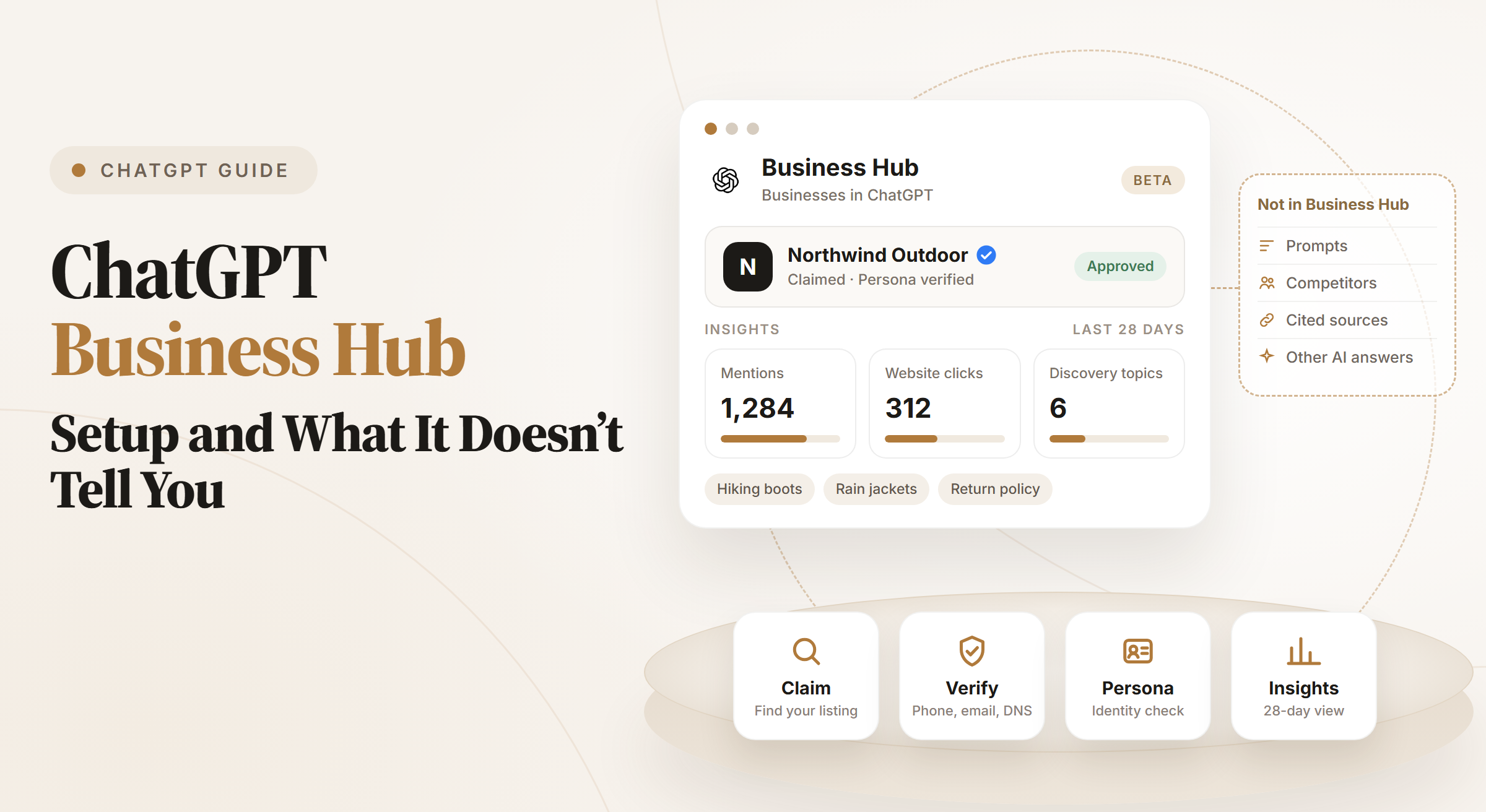


Most businesses have had no first-party view of ChatGPT. They couldn’t see how often it sent people to their site, and they had no form to correct its details.
In November 2026 OpenAI opened Businesses in ChatGPT, and Business Hub is where owners manage it.
The setup is short once you know the steps. The numbers it gives you are useful, and they answer fewer questions than most teams expect.
Key takeaways
- Business Hub is free to claim as far as OpenAI’s pages show, and it needs no Ads account or Enterprise agreement.
- You verify a claim by phone, business email, a DNS TXT record or a Shopify login, then OpenAI reviews it.
- You need a separate Persona identity check before you can edit details or see insights. It also adds the blue check.
- Insights show mentions, website clicks and discovery topics for the past 28 days, aggregated, with no individual prompts.
- For online businesses, a mention only counts when ChatGPT references your website. Your brand name alone doesn’t count.
- Claiming doesn’t change how often ChatGPT recommends you. OpenAI says so directly.
What is ChatGPT Business Hub?
ChatGPT Business Hub is the dashboard behind Businesses in ChatGPT, a beta that OpenAI launched on November 10, 2026. It lives at chatgpt.com/business-hub and in the ChatGPT sidebar.
OpenAI says ChatGPT reaches 1.2 billion people each week. Business Hub gives the businesses those people ask about four tools.
Business profile
A claimed business profile with a blue check once identity verification is approved.
Editable details
Website, description, category, logo, delivery policy, return policy and a cover photo.
Product feeds
Product feeds with prices and availability, uploaded as a CSV, a hosted URL or through Shopify.
Insights
Insights on mentions, website clicks and discovery topics in ChatGPT.
Eligible US businesses can also build a Business Agent, a labeled chat that answers questions from the information you provide. More on that below.
Is ChatGPT Business Hub free?
OpenAI’s pages don’t list a fee for claiming a business or viewing its insights. The OpenAI Help Center adds that you don’t need an Ads account or a ChatGPT Enterprise agreement.
Paid options sit next to it. A business can sponsor its Business Agent and use it as the destination for ChatGPT Ads, and those placements are labeled as sponsored.
Who can claim a business in ChatGPT?
You can claim a business if you own it or are authorized to represent it. Availability depends on where the business is and what it does. OpenAI also runs verification and integrity checks.
- Any eligible business where ChatGPT is available can claim an existing listing, or add one if it runs online.
- Claiming is initially available to businesses with a website.
- Local stores and restaurants can currently claim only an existing US listing.
- Existing OpenAI Enterprise customers and advertisers can claim through their OpenAI representative.
- Business Agents are limited to eligible ecommerce and online service businesses in the US.
OpenAI may decline a category or hold it back until it can support it safely. The Business Agents Policy lists the rules agents must follow.
How to set up ChatGPT Business Hub, step by step
Setup has two approvals: one for your claim and one for your identity. Plan for both before you start.
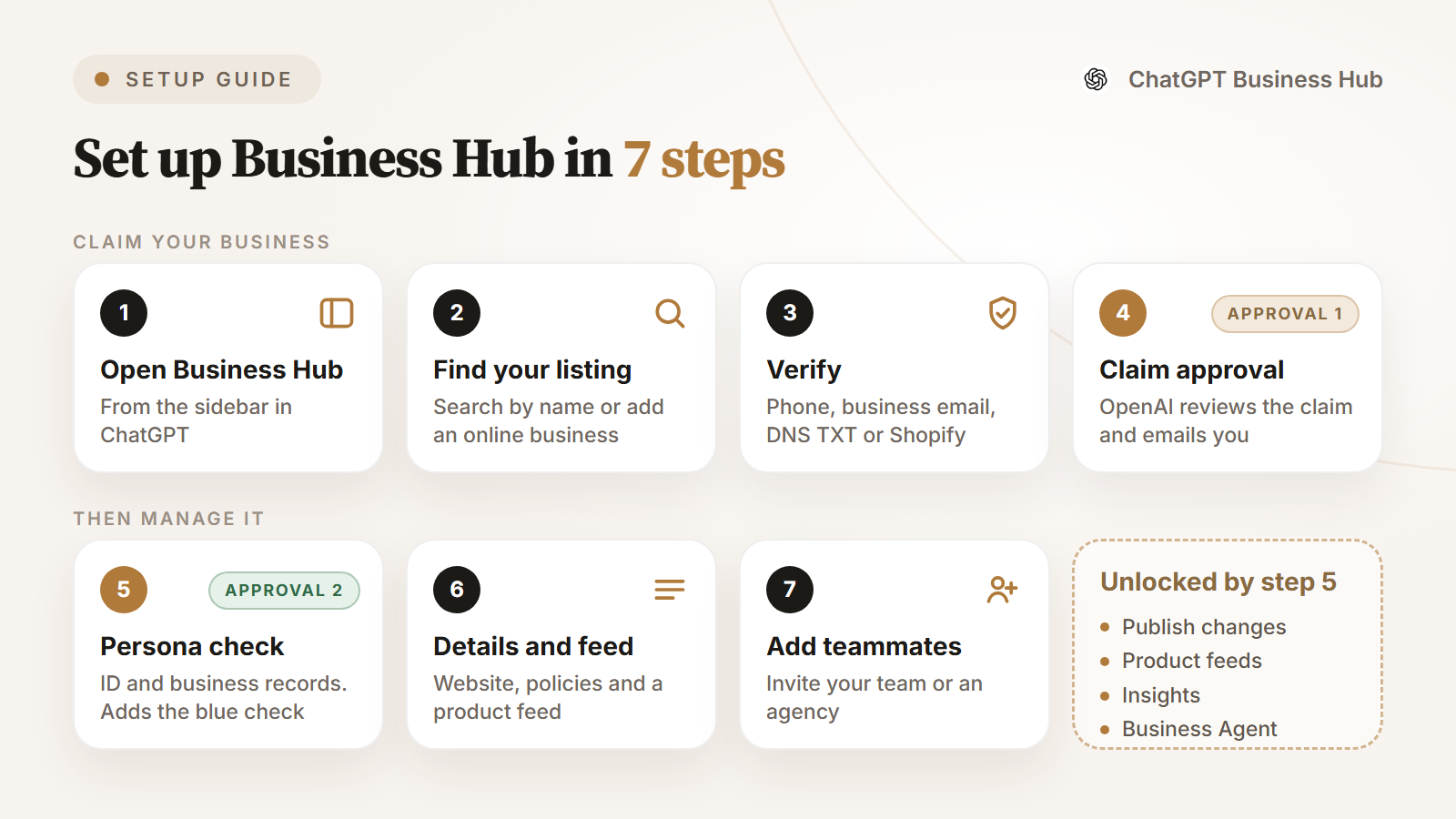
Step 1: Open Business Hub
Sign in to ChatGPT with the account you’ll use to manage the business. Open Business Hub from the sidebar or go to chatgpt.com/business-hub.
Step 2: Find your listing
Search for your business by name and select the listing that matches. Confirm the ChatGPT account that will manage it.
If you can’t find it and you run an eligible online business, you may see an option to add it. If you see Contact support, the listing is locked, so select it to request access.
Step 3: Choose a verification method
Business Hub shows the methods available for your business. Pick the one you can complete fastest, then follow the prompts.
How to verify your business in ChatGPT
Business phone
Choose a text message or an automated call, select Get code and enter the code.
Business email
Select Get code and enter the code sent to the address linked to your business.
Website domain
Add the TXT record ChatGPT shows to your DNS settings, then select Verify domain.
Shopify store
Select Connect Shopify, log in to the store you’re claiming and follow the prompts.
DNS changes can take time to appear. If someone else manages your domain, send them the exact type, host and value to add.
Step 4: Wait for claim approval
OpenAI reviews each claim and emails you a decision or a request for more information. You can cancel the claim while it’s under review.
If someone else already claimed your business, open its profile, select the ••• menu and choose Dispute ownership.
Step 5: Complete identity verification with Persona
An approved claim isn’t the end. You need Persona identity verification before you can publish changes, connect a product feed, view insights or build an agent.
Have a government ID, business registration details and proof that you can represent the business ready. The name, address and any tax number should match your official records.
The blue check on your profile appears only after OpenAI approves the Persona check. Claiming alone doesn’t add it.
Step 6: Update your details and connect a product feed
Open your profile in Business and update the website, description, category, logo and policies. OpenAI reviews each change before it goes live, and updates can take time to show in answers.
Retailers can connect a CSV feed, a hosted feed URL or a Shopify feed with prices and availability. A feed doesn’t guarantee that ChatGPT recommends your products.
Step 7: Add teammates or an agency
The admin who claimed the business can invite teammates and give an agency access. Each person signs in with their own ChatGPT account.
What is a ChatGPT Business Agent?
A Business Agent is a chat that answers customer questions with your product and policy information, using guidelines you write. It’s clearly labeled and runs separately from the user’s original ChatGPT conversation.
Agents are optional and limited to eligible US ecommerce and online service businesses with a website. They can explain products and link to your site, but they can’t complete purchases, bookings or order lookups.
What ChatGPT Business Hub shows you
Business Hub reports the last 28 days as aggregate totals. If activity is too low, a metric stays blank until there is enough to report.
For a small team, this may be the first time ChatGPT shows up as a line in a weekly report. Check it after every big content or product page change.
What ChatGPT Business Hub doesn’t tell you
Business Hub is built around your own listing. That leaves several questions for other tools.
The prompts
OpenAI shares no individual prompts or conversations, and discovery topics stay at the category level.
Unlinked brand mentions
If ChatGPT names you without referencing your website, an online business sees no mention.
Why you lost or won
There’s no answer text or sentiment, so you can’t see how ChatGPT described you.
Competitors
Insights cover the business you manage, with no view of who ChatGPT recommended instead.
Sources
You see clicks to your site, not the other domains ChatGPT cited in the same answers.
Other AI answers
Gemini, Google AI Overviews, Google AI Mode, Bing AI Mode and Claude sit outside it.
What to do next. Business Hub doesn’t suggest what to change.
OpenAI is clear on one more limit. Claiming doesn’t guarantee higher placement or sales, and ChatGPT keeps making independent recommendations.
ChatGPT Business Hub vs an AI visibility tracker
The two tools sit at different points of the same job. Ansvisor, an open-source AI search intelligence platform, follows the questions your buyers ask and the answers they get.
Quick comparison
In the table below, “a tracker” means a ChatGPT visibility tracker such as Ansvisor.
| Area | ChatGPT Business Hub | A tracker |
|---|---|---|
| Profile and product data | Lets you edit what ChatGPT knows about you. | Doesn’t manage your profile. |
| Prompts | Groups answers into discovery topics. | Runs the exact prompts you choose and stores each answer. |
| Brand mentions | Counts a mention when ChatGPT references your website. | Records your name, linked or not. |
| Competitors | Has no competitor view. | Shows who appears next to you on every tracked prompt. |
| Citations | Reports clicks to your site. | Lists every domain and URL the answer cited. |
| Engines | Covers ChatGPT only. | Can follow the same prompts in Gemini and Google’s AI results. |
| Next steps | Stops at the numbers. | With an action layer, turns changes into prioritized tasks. |

Use both. Business Hub fixes the facts ChatGPT has about you, and a tracker tells you whether those fixes change the answers.
A 30-day plan after you claim your business
Here’s a simple routine that uses Business Hub for facts and a tracker for answers.
Week 1: claim, pass Persona, and correct your website, category, policies and product feed.
Week 1: write down 25 to 50 prompts your buyers ask, including ones that don’t name your brand.
Week 2: record which brands ChatGPT names for each prompt and which pages it cites. See how to track prompts in ChatGPT.
Week 3: compare the cited sources with your pages, and fill the gaps the AI citations point to.
Week 4: check Business Hub clicks against your analytics, as covered in tracking traffic from ChatGPT.
Still missing after a month? The usual causes are covered in why brands don’t appear in ChatGPT.
How Ansvisor helps
Ansvisor tracks the prompts your buyers ask in ChatGPT, Gemini, Google AI Overviews, Google AI Mode and Bing AI Mode. Claude tracking is available on Enterprise plans.
For each prompt you see the full answer, your brand mentions, cited sources and the competitors named next to you. The Action Center turns what changed into prioritized tasks.
You can also self-host Ansvisor from the open-source project on GitHub.
Start a 14-day free trial and see how ChatGPT describes your brand next to your competitors.
FAQ
Is ChatGPT Business Hub free?
OpenAI doesn’t list a fee for claiming a business in Business Hub. You don’t need an Ads account or a ChatGPT Enterprise agreement to claim an eligible business. Advertising, including sponsoring a Business Agent, is a separate product.
How do I claim my business in ChatGPT?
Sign in to ChatGPT, open Business Hub from the sidebar and search for your business. Select the matching listing, verify by phone, business email, website domain or Shopify, and wait for OpenAI’s approval.
How does ChatGPT Business Hub count mentions?
For an online business, a mention counts when ChatGPT references the business’s website. The brand name alone doesn’t count. For a local business, it counts each time that location appears as a result in ChatGPT.
Will claiming my business make ChatGPT recommend it more often?
No. OpenAI says claiming doesn’t guarantee more visibility, higher placement or sales, and advertising doesn’t influence ChatGPT’s independent answers. Claiming controls the information you provide, not the recommendations.
Can I see competitors in ChatGPT Business Hub?
Business Hub insights cover the business you manage: its mentions, website clicks and discovery topics. OpenAI doesn’t describe any competitor view. To compare your brand with rivals on the same prompts, use an AI visibility tracker.


Cihan Geyik


Make Your Brand Visible in AI Answers.


The open-source AI Search Execution Platform. Track how AI answers talk about your brand and act on it.
Open source · MIT licensePlatform
Solutions
- Solutions Overview
- SEO & AEO Teams
- Content Teams
- PR & Brand Teams
- Founders
- Growth Teams
- Product Development
- Business Development
- E-commerce Teams
- Agencies
- Developer Teams
- AI Marketing
- AI for Sales
- Digital Marketing
- Content Marketing
- AI SEO
- AI for Agencies
- AI Brand Monitoring
- Generative Engine Optimization
- Answer Engine Optimization
- ChatGPT SEO
- Google AI Mode SEO
- AI Competitor Analysis
- Local AI SEO
Resources
 AI Overviews
 AI Mode
 Bing AI Mode
 Copilot
 Perplexity
 Claude
© 2026 Ansvisor, a brand of Empler AI Inc. · 1401 PE Ave. Unit 105, Wilmington, DE 19806, United States