
You can publish accurate, useful, and well-structured content and still have an important technical question left unanswered: Can the systems involved in AI Search actually access your website?
AI crawler access is becoming part of technical search visibility. Websites can intentionally
or accidentally restrict bots through robots.txt, CDN settings, firewalls,
authentication, HTTP responses, JavaScript implementations, or other technical controls.
But crawler access is more nuanced than simply allowing every bot. Different crawlers can serve different purposes, and allowing a crawler does not guarantee that your content will appear, be cited, or be recommended in an AI-generated answer.
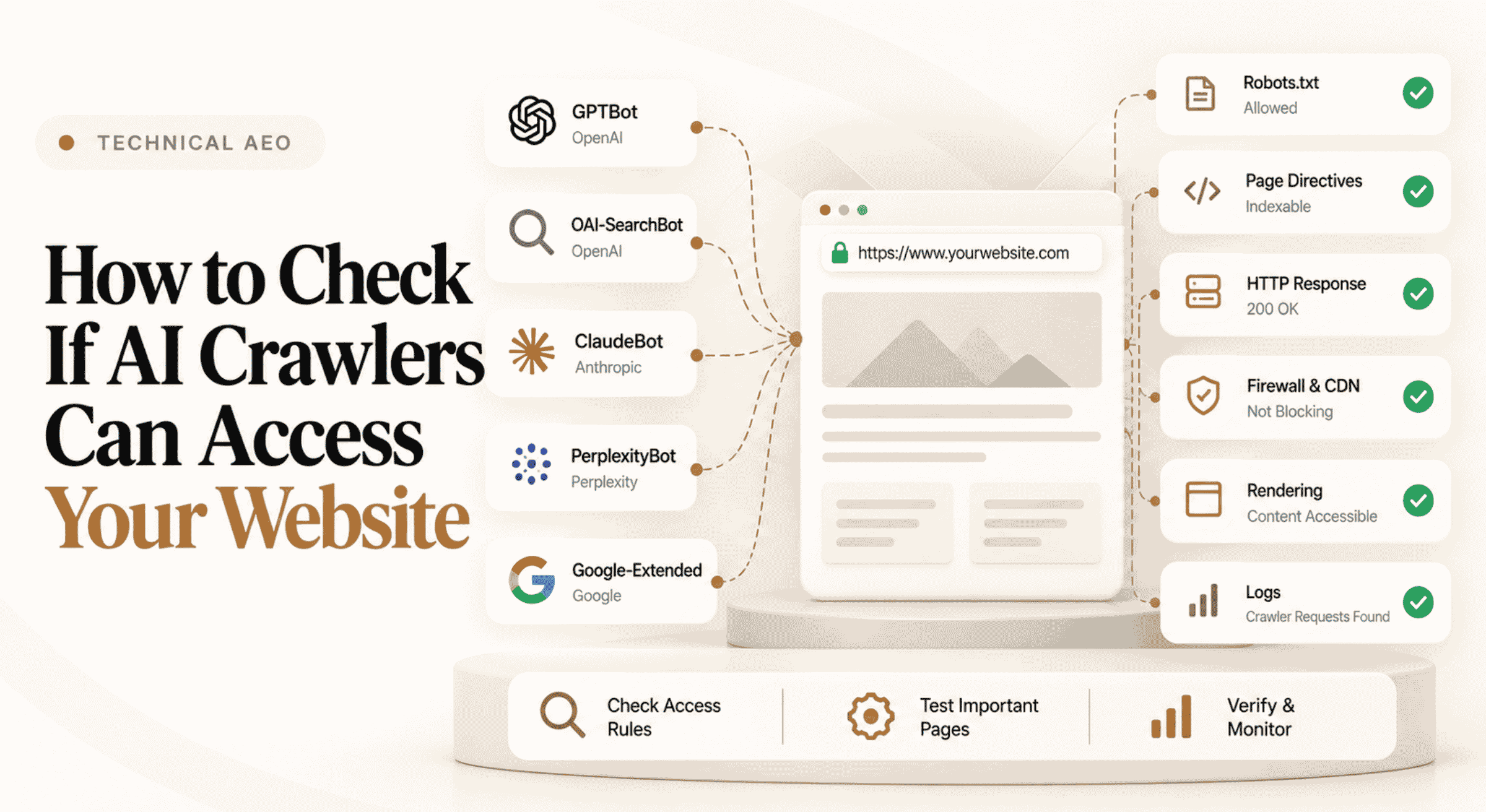
To check whether AI crawlers can access your website, review your
robots.txt rules for relevant user-agents, inspect page-level robots
directives, verify that important URLs return accessible HTTP responses, check CDN,
firewall, and bot-protection settings, confirm that important content is available in the
rendered page, and review server or CDN logs where available. Test the specific crawler
policies that matter to your organization because AI companies may use different crawlers
for search, user-requested retrieval, and model training. Crawler access is only an
eligibility condition—it does not guarantee AI visibility or citations.
robots.txt file.noindex where relevant.An AI crawler is an automated user-agent that accesses webpages on behalf of an AI company, AI-powered product, search experience, retrieval system, or related service.
The important distinction is that “AI crawler” is not one single function. A provider may operate multiple user-agents for different purposes.
An AI crawler is an automated user-agent used by an AI-related service to request web content. Depending on the provider and crawler, that access may support search discovery, user-requested retrieval, product functionality, model improvement, training, or other documented purposes.
One of the most important technical distinctions is the difference between allowing content to be accessed for search or user-requested retrieval and allowing content to be collected for model training.
These controls should not automatically be treated as identical.
Some user-agents are associated with search indexing, retrieval, or accessing pages in response to user requests.
Other user-agents may be associated with model training or model improvement according to the provider's published documentation.
Do not make crawler decisions based only on the company name. Review the documented purpose of each user-agent. A provider may expose separate controls for search, user-requested access, and training-related crawling.
The exact list depends on which AI products and discovery environments matter to your organization. Commonly discussed user-agents include crawlers operated by OpenAI, Anthropic, Google, Perplexity, and other AI-related services.
Because crawler documentation and policies can change, always verify the current user-agent names and purposes directly with the relevant provider before changing production rules.
OAI-SearchBot
Associated with OpenAI's search-related crawling. Treat separately from other OpenAI
user-agents according to current provider documentation.
GPTBot
An OpenAI crawler with controls documented separately from search and user-requested
access.
ChatGPT-User
Can be associated with user-requested interactions in ChatGPT rather than general
search crawling.
ClaudeBot / Claude-SearchBot / Claude-User
Anthropic documents multiple user-agents with different purposes. Review each separately
when defining crawler policy.
Googlebot / Google-Extended
These controls should not be treated as interchangeable. Googlebot supports Google Search
crawling, while Google documents Google-Extended as a separate control token for certain
generative AI uses.
PerplexityBot / Perplexity-User
Perplexity documents crawler and user-requested access behavior separately. Review current
documentation before setting access rules.
This list is not permanent or exhaustive. AI companies can introduce new user-agents or update existing crawler behavior. Technical teams should maintain crawler policy as an ongoing configuration rather than a one-time setup.
Checking only robots.txt is not enough. A crawler can be permitted there and
still fail to access the page because another layer blocks or breaks the request.
A more complete review follows five stages:
The first place to investigate is usually the website's robots.txt file. It is normally available from the root of the domain:
https://example.com/robots.txt
Search the file for the user-agent you want to evaluate. Then review the rules that apply to that crawler.
A simple rule can explicitly allow crawling:
User-agent: OAI-SearchBot
Allow: /
A rule such as the following indicates that the crawler should not crawl the site:
User-agent: OAI-SearchBot
Disallow: /
But real robots.txt files can be much more complicated. Multiple user-agent
groups, wildcard rules, directory-specific restrictions, generated configurations, and CDN
features can all affect the result.
User-agent: * rule may restrict crawling more widely than intended.
Passing the robots.txt check does not mean the page is automatically eligible
for search indexing or other forms of discovery.
Individual pages can contain robots directives in HTML or HTTP headers. A common example is:
<meta name="robots" content="noindex">
A page can therefore be crawlable while still carrying instructions that affect whether it should be indexed by search engines that support those directives.
Depending on your setup, review:
X-Robots-Tag directives in HTTP headers.
Crawlability and indexability are related but different concepts. A crawler may technically be able to request a URL while other directives affect how a search engine handles that page afterward.
A crawler cannot reliably use content that it cannot retrieve successfully.
Test strategically important URLs and inspect the HTTP response. This is especially important after migrations, CMS changes, URL restructuring, security updates, or CDN configuration changes.
Pay particular attention to cases where a normal browser receives a 200 response
but automated user-agents receive 403 Forbidden, 429 Too Many Requests,
challenge pages, or another response.
One of the easiest AI crawler problems to miss happens outside the website's visible content
and robots.txt file.
Modern websites frequently use CDNs, Web Application Firewalls, anti-bot systems, rate
limiting, managed challenges, IP rules, and security services. These systems can block an
automated crawler even when robots.txt allows it.
Your crawler directives indicate that the bot is permitted to request the content.
A firewall, bot-management rule, CDN challenge, rate limit, or security configuration prevents the crawler from successfully retrieving the page.
Review security events and bot-management settings for the relevant user-agents. If your infrastructure provides verified-bot controls, use the provider's recommended verification mechanisms rather than trusting a user-agent string alone.
User-agent strings can be spoofed. Do not weaken website security simply because a request identifies itself as a known AI crawler. Use official crawler documentation and supported verification methods when making security decisions.
Successful access to a URL does not necessarily mean the crawler receives all of the information a user sees after interacting with the page.
Important content can depend on client-side JavaScript, delayed API calls, user interaction, authentication, cookie consent, tabs, accordions, or application state.
JavaScript itself is not automatically a problem. The practical question is whether the crawler or search system you care about can reliably access the important information.
Manually checking one page is useful for diagnosis, but larger websites need a repeatable process for finding technical visibility problems across many URLs.
An audit can help identify patterns such as inaccessible URLs, weak technical signals, content-structure problems, trust issues, or other conditions worth investigating.
Ansvisor's AI Visibility Site Audit evaluates public website URLs across 47 weighted AEO and GEO signals grouped into Structure, Content, Authority, E-E-A-T, and Trust.
The purpose of an audit is to identify technical and content improvements—not to promise that passing a specific check will produce an AI mention or citation.
This distinction is critical.
Allowing an AI-related crawler means that the crawler may be permitted to access content according to the rules and technical conditions of your website. It does not mean the content will necessarily be selected, indexed, retrieved, mentioned, recommended, summarized, or cited in an AI-generated response.
Crawler Access ≠ AI Visibility ≠ AI Citation. Technical accessibility can remove one potential barrier, but visibility still depends on the AI system, the user's prompt, retrieval behavior, source selection, relevance, content quality, authority signals, available information, and other factors.
This is why technical auditing should be connected with actual visibility measurement. After verifying access, teams can monitor relevant prompts, brand mentions, citations, competitors, and AI-referred traffic to understand what is happening in practice.
Ansvisor's AI Search Intelligence Platform connects these layers so technical signals can be evaluated alongside observable AI Search performance rather than in isolation.
Configuration tells you what should happen. Logs can help show what is actually happening.
If your hosting, CDN, or server infrastructure provides request logs, review them for relevant crawler activity. This can help answer whether a crawler is requesting your pages, which URLs it accesses, how frequently it visits, and what HTTP responses it receives.
Useful log fields can include the requested URL, timestamp, user-agent, HTTP status, response size, request method, and infrastructure action such as allowed, challenged, rate-limited, or blocked.
A user-agent string alone is not proof of crawler identity. User-agents can be spoofed. Where identity matters for security decisions, follow the verification guidance published by the relevant provider and use supported infrastructure controls.
A homepage being accessible does not prove that the rest of the website is equally accessible.
Different sections can use different templates, directories, rendering methods, security rules, or CMS configurations. Test representative URLs from the areas that matter most to search and AI discovery.
A website might allow access to:
//blog//features/while accidentally blocking:
/compare//resources//docs/A domain-level statement such as “AI crawlers can access our website” would therefore hide an important visibility gap.
Crawler access and URL discovery are different issues. A page may be technically accessible while remaining difficult to discover because it is poorly connected to the rest of the website.
Review your XML sitemap and internal linking to make sure strategically important public URLs can be discovered through the website's normal information architecture.
A sitemap should not be treated as a substitute for good internal linking. Important pages should normally be discoverable through the site's architecture as well.
Websites can expose the same or substantially similar content through multiple URLs because of parameters, alternate paths, protocol variations, subdomains, trailing-slash behavior, or CMS-generated duplicates.
Review canonical signals so that the preferred version of an important page is clear and consistent.
Technical access answers only one part of the question.
Once important pages are accessible, the next question is whether the brand and its content are actually appearing across relevant AI Search experiences.
Build a repeatable set of prompts related to your products, category, customer problems, comparisons, competitors, and buying decisions. Then monitor those prompts over time.
Ansvisor's Prompt Monitoring & Volumes can be used to organize and monitor relevant prompts, while Answer Engine Insights helps analyze how brands and competitors appear across AI-generated answers.
Brand visibility and website citations are related but different signals.
An AI-generated answer can mention your brand without linking to your website. It can also cite a third-party page that discusses your brand. Conversely, one of your pages may be used as a source in an answer where the brand itself is not the primary recommendation.
This is why crawler analysis should eventually connect with source-level measurement.
With Citations Monitoring, teams can inspect the domains and exact URLs appearing as sources across monitored AI Search prompts.
Another observable signal is traffic arriving from identifiable AI platforms.
AI referral traffic should not be treated as a complete measure of AI visibility. Many AI interactions do not result in a website visit, and attribution can vary depending on the platform and analytics setup.
However, when referral data is available, it can help connect AI discovery with actual website sessions and downstream behavior.
Ansvisor's AI Traffic Analytics helps teams analyze identifiable traffic from AI sources alongside broader AI Search visibility signals.
Do not use AI referral traffic as the only success metric. A brand can gain meaningful visibility inside AI-generated answers without receiving a click from every interaction. Evaluate traffic alongside prompts, mentions, citations, competitors, and business outcomes.
429 or similar restrictions.
5xx responses.
There is no universal crawler policy that is right for every organization.
The appropriate configuration depends on the crawler's documented purpose, your business objectives, legal and licensing considerations, security requirements, publishing strategy, and whether you want the relevant service to access particular areas of your website.
Instead of using a single “allow AI” or “block AI” decision, evaluate individual user-agents and purposes.
Crawler policy should involve the appropriate stakeholders. Depending on the organization, decisions may involve SEO, engineering, security, legal, content, data governance, and executive teams rather than being treated only as an SEO configuration.
robots.txt file.
X-Robots-Tag directives.
403, 429, 5xx, challenges, and redirect problems.
Technical crawler analysis becomes more valuable when it is connected to actual business priorities.
A blocked crawler on an unimportant archive page may require little attention. A technical restriction affecting a high-value product page that is also missing from strategically important AI Search prompts can deserve much higher priority.
This is the broader role of Ansvisor's AI Search Action Center: turning measurable signals into prioritized opportunities, Actions, and Tasks rather than leaving teams with another disconnected technical report.
The workflow moves from Analytics → Opportunities → Actions, with validation completing the feedback loop.
Start by reviewing your robots.txt rules for the relevant crawler user-agents.
Then check page-level robots directives, HTTP responses, CDN and firewall settings, bot
protection, rendering, and server or CDN logs where available. Test representative URLs
across important sections rather than checking only the homepage.
The crawlers to check depend on the AI products relevant to your strategy. Providers can use different user-agents for search, user-requested retrieval, model training, or other functions. Review current provider documentation before creating or changing crawler rules.
Robots.txt can communicate crawling rules to crawlers that respect the protocol, but it is
only one layer of access control. A crawler can be allowed in robots.txt and
still be blocked by a CDN, firewall, WAF, authentication system, bot-management rule, or
another infrastructure layer.
They are separate OpenAI user-agents associated with different forms of web access. OpenAI documents its search crawler, general web crawler, and user-requested access separately. Websites should review current OpenAI documentation and decide which forms of access align with their policies rather than treating every OpenAI crawler as identical.
No. They should not be treated as interchangeable controls. Googlebot is associated with Google Search crawling, while Google documents Google-Extended as a separate control token for certain generative AI uses. Organizations should review Google's current documentation before changing either configuration.
Some providers expose separate user-agents or controls for different purposes, which can make more granular policies possible. The available controls vary by provider, so decisions should be based on current official documentation rather than assuming all AI access works the same way.
Allowing relevant crawlers can remove a potential technical barrier, but it does not guarantee AI visibility. Whether content appears in an AI-generated answer can depend on the system, prompt, retrieval behavior, source selection, relevance, available information, and other factors.
No. Crawler access is not a citation guarantee. A website can be technically accessible and still not be selected as a source for a particular AI-generated answer.
Yes. CDN, WAF, firewall, anti-bot, rate-limiting, and security rules operate independently
from robots.txt. Review infrastructure logs and bot-management settings when a
crawler appears to be allowed but cannot successfully retrieve content.
Server, CDN, or security logs can provide evidence of requests using relevant user-agents, including requested URLs and HTTP responses. However, user-agent strings can be spoofed, so use provider-supported verification methods where confirming crawler identity is important.
No. Crawler policy depends on business objectives, the documented purpose of each crawler, publishing strategy, security requirements, and legal or licensing considerations. Evaluate individual user-agents rather than applying one universal rule to every AI-related crawler.
A technically inaccessible page has an obvious disadvantage in any discovery workflow that depends on retrieving that page.
That makes crawler access an important part of technical AI Search readiness. Review
robots.txt, page-level directives, HTTP responses, security infrastructure,
rendering, sitemaps, canonicalization, and logs to understand whether important public
content can actually be reached.
But access is only the beginning.
The broader question is whether your brand is visible for the prompts that matter, whether your pages are being cited, which competitors and sources are winning, whether AI platforms are sending measurable traffic, and what action should happen next.
Crawlability → Access → Rendering → Verification → Monitoring → Visibility → Action.
Ansvisor connects technical AI Search readiness with visibility intelligence through its AI Search Intelligence Platform, helping teams move from Analytics → Opportunities → Actions.


Co-founder at Ansvisor
Cihan Geyik is the co-founder of Ansvisor, an open-source, cloud-ready AI Visibility platform for AI Search. With more than 15 years of experience in digital marketing and growth, he writes about AI visibility, AI search, AEO, GEO, citations, and answer engines. He focuses on helping brands understand and improve their presence across ChatGPT, Gemini, Perplexity, Google AI Overviews, and other AI-powered discovery platforms.



© 2026 Ansvisor. All rights reserved. Ansvisor is an open-source AI Search Intelligence Platform for AI Visibility.


.svg)