


Google Analytics (GA4)
Connect Google Analytics Data With AI Search Intelligence
Connect Google Analytics 4 to Ansvisor to bring website traffic, engagement, and conversion signals into your AI Search Intelligence workflows. Understand what happens after users reach your website and use those signals to prioritize opportunities with greater business impact.
AI Traffic Intelligence
Understand traffic attributed to AI platforms and analyze how those visitors behave after reaching your website. Track trends across landing pages, sessions, engagement, and other available GA4 dimensions and metrics.
Content Opportunities
Identify landing pages and content that attract valuable traffic, engagement, or conversions. Combine these signals with AI Visibility and citation data to uncover content worth protecting, improving, or expanding.
Action Opportunities
Use website performance signals to help prioritize what to work on next. Ansvisor can combine GA4 data with AI Search Intelligence to surface recommendations and actions around pages and opportunities that show stronger business potential.
Business Impact
Move beyond measuring AI Visibility alone. Connect visibility signals with downstream website performance to understand whether AI Search is contributing to meaningful user behavior and business outcomes.
Depending on your GA4 configuration and available data, this can include signals such as:
Sessions — Understand traffic reaching your website and individual landing pages.
Users — See how many users are reaching and interacting with your website.
Engaged Sessions — Identify visits where users meaningfully interact with your content.
Engagement Rate — Compare the quality of traffic across pages and acquisition sources.
Average Engagement Time — Understand which landing pages hold user attention.
Landing Pages — Identify where visitors enter your website and connect those pages with AI Search opportunities.
Traffic Sources & Referrals — Analyze where website visits originate, including identifiable AI referral traffic.
Key Events / Conversions — Connect AI Search opportunities with the important actions configured in your GA4 property.
Revenue & Ecommerce Performance — Where ecommerce tracking is configured, use available purchase and revenue signals to understand commercial impact.
From Visibility to Business Outcomes
Google Analytics shows what users do after they reach your website. Ansvisor connects those behavioral and business signals with AI Visibility to help determine which opportunities deserve attention.
How to Integrate Google Analytics 4 (GA4)
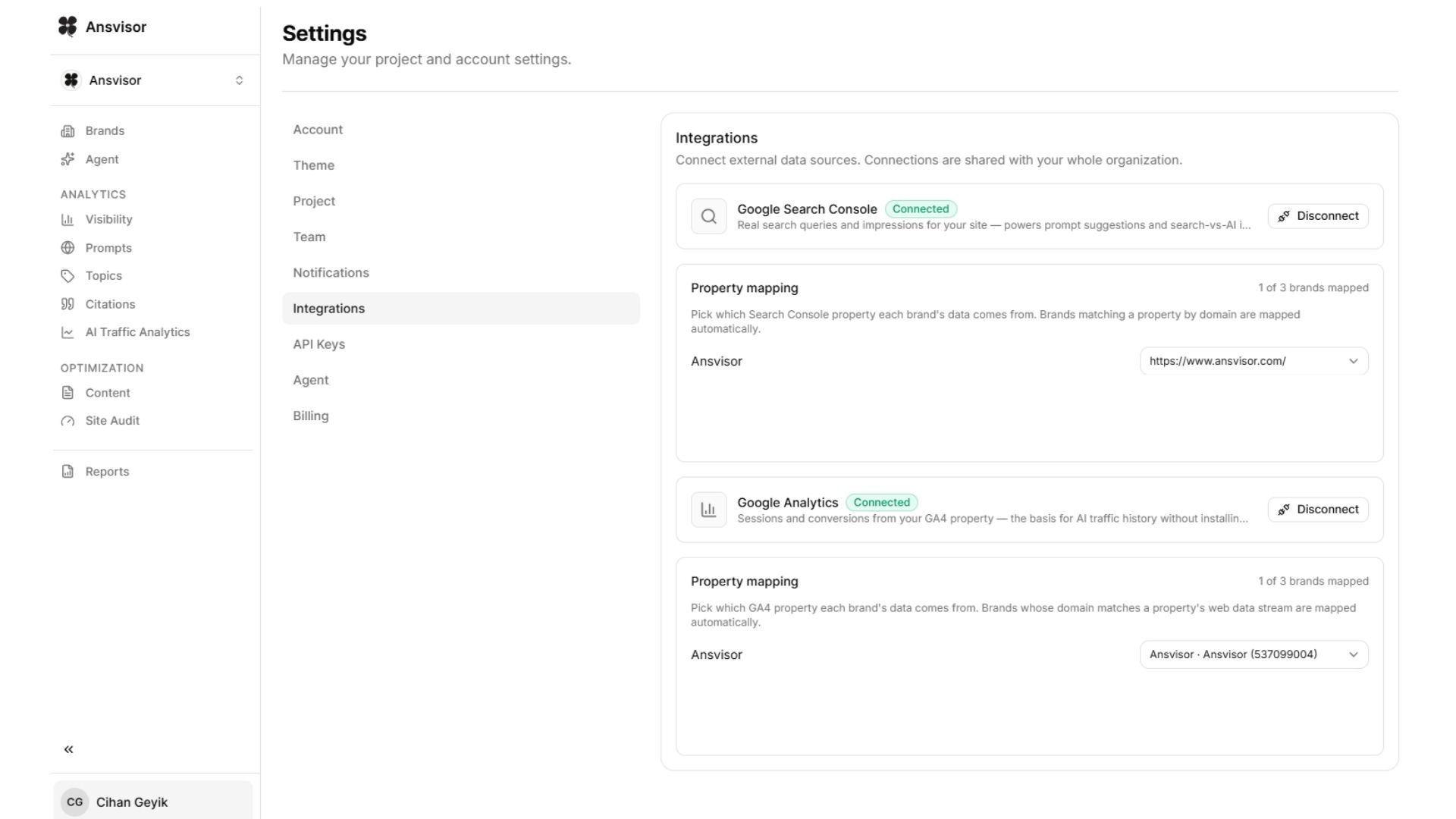
Connect Google Analytics 4 to Ansvisor in just a few steps. Click your profile name and open Settings, then select Integrations.
Connect your Google Analytics account and choose the GA4 property you want to map to each brand in Ansvisor.
Once connected, Ansvisor automatically starts using available GA4 data across its intelligence workflows. Website traffic, landing page, engagement, conversion, and other available business signals can be combined with AI Visibility data to help identify higher-impact content opportunities, recommendations, and prioritized actions.
Google Analytics 4 connection path:
Profile → Settings → Integrations → Google Analytics → Connect → Select Property
Open Settings:https://app.ansvisor.com/dashboard/settings
More integrations